|
Quick Tour
Overview of the basic features |
| Page 2 of 13 |
|
|
|
|
|
| |
| Opening a Standard MIDI File |
|
| Choose Open...
from the File menu to open Standard
MIDI Files ( S.M.F.). CAMPS allows you to open multiple documents and exchange data between them. |
|
| |
|
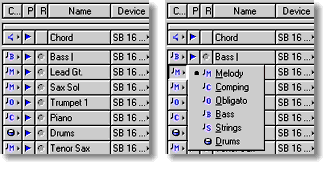
 When
opening a Standard MIDI File, CAMPS automatically analyzes Line data and assigns appropriate
Line Blocks and one of six Category settings (orchestration role such as "Melody", "Bass", etc. ) to each Track. You can alter
these settings at any time. When
opening a Standard MIDI File, CAMPS automatically analyzes Line data and assigns appropriate
Line Blocks and one of six Category settings (orchestration role such as "Melody", "Bass", etc. ) to each Track. You can alter
these settings at any time. |
|
 |
| |
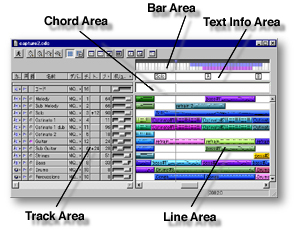
| CAMPS organizes a song Track's MIDI Line data into Line
Blocks for musical analysis and manipulation control. These Blocks are
mostly separated by Line Phrases, that is, a Line of continuous Notes. When importing a Standard MIDI File or CAMPS
v3 Document, or Recording in CAMPS, a "pause" in a Track's Note data at a Bar division typically constitutes
the end of a Line Block, and the beginning of another. |
|
| |
|
|
 |
|
| Microworks software
for the arts |
| © 1989 -
Microworks Corporation |
|