| Song Form Detection and Orchestration Role
Detection |
| This is, by far, one of the most powerful and unique features avilable only in CAMPS. With just a single mouse-click, CAMPS automatically creates Chord Blocks containing Chords for an entire Document using all existing Tonal Line data. |
|
To enable this 100 % Automatic Chord Definition, CAMPS analyzes:
|
|
|
|
|
|
|
 |
Tonal quality of all Tracks |
|
|
|
Orchestration Role of all Tracks such as "Melody", "Bass", etc. |
|
|
|
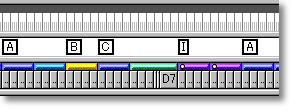
Song Form |
|
|
|
|
|
of your Composition.
|
| Based on the result of these analyses, CAMPS creates Chords for an entire Composition. |
| Simply import your MIDI Composition into CAMPS and then choose the EZHarmonize All command from the Chord menu. As you repeatedly
choose the command, you will hear hundreds of different Chord Progressions based
on the analysis of your original Composition. |
| By holding the Shift key down while choosing the EZHarmonize All, CAMPS will look for results with fewer Chord Blocks (more repetitions of Chord Blocks). By holding the Ctrl key down instead, CAMPS will look for results with TWO Chords per Bar where possible. You can combine both keys if you desire. |
|
Here is a list of MID files used for our recentl beta testing on CAMPS v4:
|
|
Try yourself by importing a MIDI file into CAMPS and then choose the EZHarmonize All command from the Chord menu. If you don't like the result, delete it and try again.
|
|
 The "EZ" tools in CAMPS are designed to give a quick starting point and help you familiarize with program's features for building compositions. They are not designed to automatically create some great music for you. The more parameters you designate available in the program, the more musical results you will get. The "EZ" tools in CAMPS are designed to give a quick starting point and help you familiarize with program's features for building compositions. They are not designed to automatically create some great music for you. The more parameters you designate available in the program, the more musical results you will get. |
|